Accounting Software Development Cost: Complete Pricing Guide for 2027
Ask any CFO who's been through a software selection process, and they'll tell you the same story: the spreadsheet that used to "work fine" eventually became the bottleneck nobody could ignore. Reconciliations that took an afternoon start taking a week. Finance teams spend more time chasing formula errors than analyzing the numbers. And the moment a business scales past a certain size, spreadsheets stop being a tool and start being a liability.
That's the backdrop driving a wave of investment in accounting software in 2027. Finance has been one of the last major business functions to fully embrace digital transformation, but that's changing fast. AI-powered bookkeeping, real-time bank reconciliation, and automated tax compliance have moved from "nice to have" to genuinely expected — both by internal finance teams and by the external accountants and auditors who work with them. Cloud accounting adoption, once a hard sell to risk-averse finance departments, is now the default expectation for any new system.
For founders building a fintech product, CFOs evaluating an internal tool, or enterprises modernizing a legacy ERP finance module, the question isn't whether to invest — it's how much it actually costs to build accounting software that's accurate, compliant, and trustworthy enough for people to bet their books on. That last part matters more here than in almost any other software category: a bug in a task manager is an inconvenience, but a bug in a general ledger can mean a misstated balance sheet, a failed audit, or a regulatory penalty.
This guide walks through exactly what goes into estimating accounting software development cost in 2027 — the features, the compliance requirements, the technology stack, the team, and the price ranges across MVP, SME, and enterprise tiers — so you can evaluate a vendor quote (or scope your own build) with real confidence.
What Is Accounting Software?
Accounting software is a category of business applications designed to record, process, and report financial transactions in accordance with recognized accounting standards. At its core, it replaces manual bookkeeping and spreadsheet-based tracking with structured, auditable financial data management.
Purpose: Accurately track income, expenses, assets, and liabilities while producing the financial reports businesses need for compliance, decision-making, and tax filing.
Core functions:
Recording financial transactions (general ledger)
Managing accounts payable and receivable
Generating invoices and tracking payments
Reconciling bank transactions
Producing financial statements (P&L, balance sheet, cash flow)
Calculating and filing taxes
Managing payroll
Industries relying on accounting software:
Small and medium businesses across every sector
Accounting and bookkeeping firms serving multiple clients
E-commerce and retail businesses
Professional services firms
Manufacturing and distribution companies
Nonprofits requiring fund accounting
Enterprises needing ERP-integrated finance modules
Types at a glance:
Small business accounting
Enterprise/ERP-integrated accounting
Cloud-based accounting
Desktop/on-premise accounting
Industry-specific accounting (construction, nonprofit, healthcare)
Business benefits:
Reduced manual error compared to spreadsheets
Real-time visibility into financial health
Faster month-end close and audit readiness
Automated compliance with tax regulations
Better cash flow forecasting and decision-making
In 2027, buyers expect more than digitized bookkeeping — they expect software that actively reduces manual finance work through automation and AI, not just software that stores the numbers.
Market Overview (2027)
Several forces are shaping both demand and development Accounting Software cost in this category:
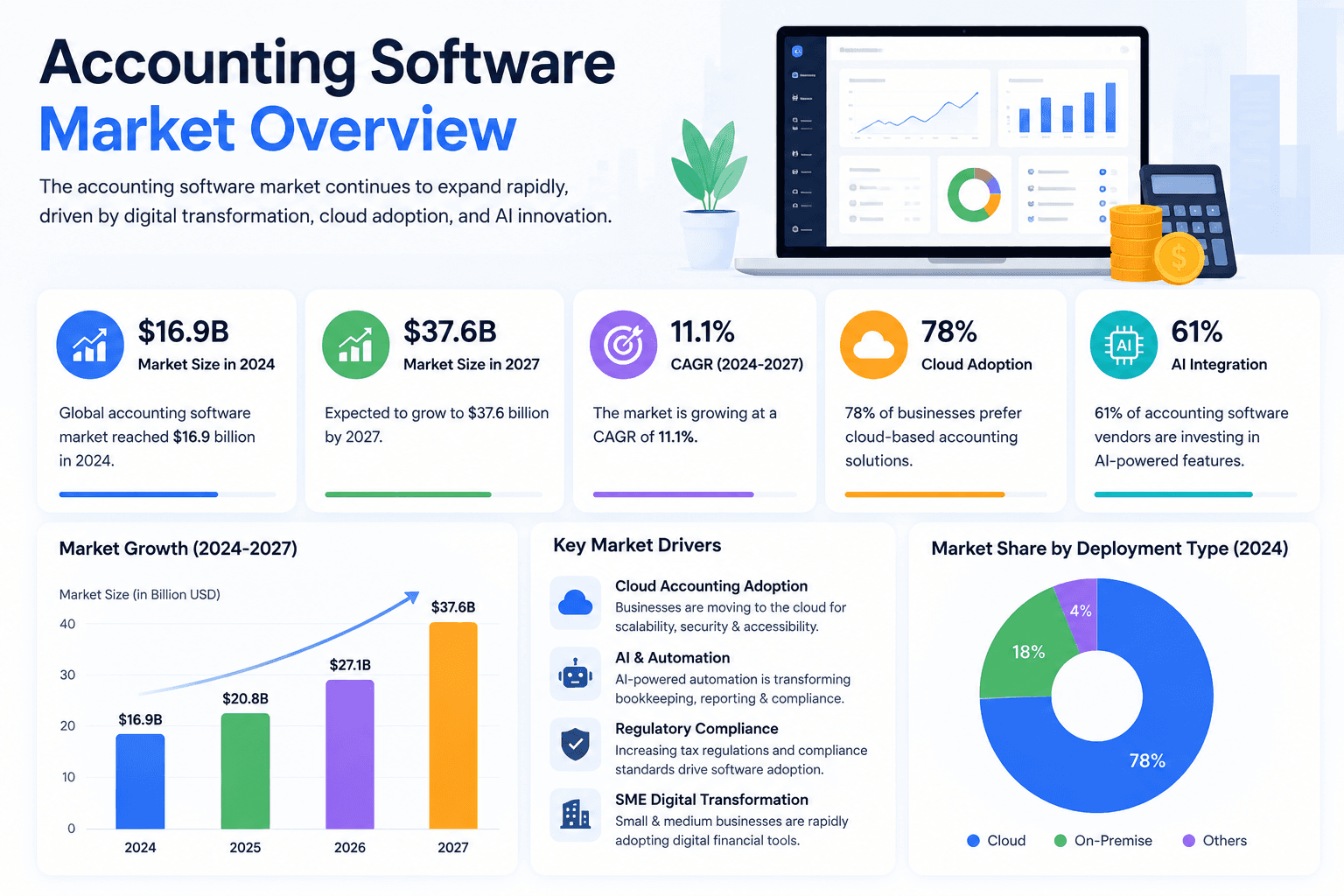
Continued cloud accounting adoption. Cloud-based platforms have become the default choice for new deployments, driven by remote/hybrid finance teams and the need for real-time collaboration between businesses and their external accountants.
AI integration is now a baseline expectation. Features like automated transaction categorization, AI-assisted reconciliation, and predictive cash flow forecasting have shifted from differentiators to table stakes for competitive products.
SME digital transformation. Small and medium businesses that historically relied on spreadsheets or basic desktop software are increasingly moving to cloud platforms, expanding the addressable market for new entrants.
Enterprise finance modernization. Larger organizations are replacing legacy ERP finance modules with more modern, API-first architectures that integrate more easily with banking, payment, and reporting tools.
Regulatory complexity is increasing. Real-time tax reporting mandates (in various jurisdictions), evolving VAT/GST requirements, and stricter audit trail expectations are raising the compliance bar — and the associated development cost — for any serious accounting product.
Embedded finance and open banking are pushing accounting platforms to integrate more deeply with banks and payment processors directly, rather than relying purely on manual statement imports.
For anyone scoping a build, this means the "acceptable MVP" in 2027 needs solid automation and integration capability from the outset — a bare-bones ledger and invoice generator alone won't be competitive in a market this mature.
Types of Accounting Software
Type | Best For | Example |
|---|---|---|
Small Business Accounting | Solopreneurs, small teams | Wave, FreshBooks |
Enterprise Accounting | Large organizations with complex needs | Oracle NetSuite, SAP |
Cloud Accounting | Businesses needing remote access, real-time collaboration | QuickBooks Online, Xero |
Desktop Accounting | Businesses wanting local control, no recurring subscription | Legacy QuickBooks Desktop |
ERP Accounting | Companies needing finance integrated with inventory, HR, supply chain | Microsoft Dynamics 365, Odoo |
Tax Management Software | Businesses focused on tax compliance and filing | Specialized tax platforms |
Payroll Software | Companies managing employee compensation and statutory deductions | Standalone or integrated payroll modules |
Bookkeeping Software | Basic transaction recording for very small businesses | Simplified ledger tools |
Billing Software | Subscription or invoice-heavy businesses | Recurring billing platforms |
Financial Planning Software | Budgeting, forecasting, and FP&A teams | Dedicated planning tools |
Multi-Company Accounting | Accounting firms and holding companies managing multiple entities | Multi-tenant platforms |
AI Accounting Platforms | Businesses wanting automated categorization and predictive insights | Emerging AI-native tools |
Most modern products blend categories — for instance, combining cloud accounting with payroll and light ERP-style inventory tracking — which is why scoping the right combination early is critical to controlling cost.
Core Features
Category | Feature | Notes |
|---|---|---|
Access & Identity | User Login | Email/password or SSO |
Access & Identity | Role-Based Access | Owner, accountant, staff, read-only roles |
Core Ledger | Dashboard | Financial overview at a glance |
Core Ledger | General Ledger | Central record of all transactions |
Core Ledger | Accounts Payable | Vendor bills and payment tracking |
Core Ledger | Accounts Receivable | Customer invoices and collections |
Core Ledger | Bank Reconciliation | Matching bank transactions to books |
Billing | Invoice Generation | Create and send customer invoices |
Billing | Recurring Billing | Subscription and repeat invoicing |
Billing | Expense Management | Track and categorize business expenses |
Operations | Purchase Orders | Formal vendor purchase tracking |
Operations | Inventory Management | Stock tracking tied to accounting entries |
Operations | Payroll | Employee pay, deductions, statutory compliance |
Compliance | Tax Calculation | Automated tax computation |
Compliance | GST/VAT | Region-specific tax handling |
Compliance | Audit Trail | Immutable record of all changes |
Reporting | Financial Reports | Custom and standard report generation |
Reporting | Cash Flow Reports | Inflow/outflow tracking |
Reporting | Balance Sheet | Assets, liabilities, equity snapshot |
Reporting | Profit & Loss | Revenue and expense summary |
Usability | Notifications | Payment due, low balance, anomaly alerts |
Usability | Multi-Currency | Support for international transactions |
Usability | Multi-Language | Localization for global users |
Data | Document Management | Attach receipts, contracts, statements |
Data | Cloud Backup | Automated data redundancy |
Insight | Analytics | Trend analysis and KPIs |
Admin | Admin Dashboard | Org-wide settings and controls |
Integration | API Integration | Connect to banks, payment processors, CRMs |
Workflow | Approval Workflow | Multi-step sign-off for payments/invoices |
Portals | Customer Portal | Self-service invoice viewing and payment |
Portals | Vendor Portal | Self-service bill submission and status tracking |
AI Features in 2027
AI has fundamentally changed what "good" accounting software looks like. The following capabilities are increasingly expected in competitive products:
AI Bookkeeping – Automated transaction recording and categorization
Invoice OCR – Extracting line-item data from scanned or photographed invoices
Receipt Scanning – Mobile capture and auto-categorization of expenses
AI Expense Categorization – Learning from historical patterns to reduce manual tagging
Fraud Detection – Flagging anomalous transactions in real time
Predictive Cash Flow – Forecasting future cash position based on historical patterns
AI Financial Advisor – Contextual recommendations based on the business's financial data
Tax Prediction – Estimating tax liability before filing season
Automated Journal Entries – AI-suggested entries for recurring or complex transactions
AI Chat Assistant – Natural language queries against financial data ("What was our Q2 marketing spend?")
Voice Accounting – Voice-driven data entry and queries
Generative AI Reports – Auto-generated narrative summaries alongside financial statements
Forecasting – Longer-horizon financial projections using ML models
AI Agents – Autonomous handling of routine tasks like reconciliation or reminder follow-ups
These features typically require OCR pipelines, LLM integration, and carefully governed data pipelines — since financial data accuracy requirements are far stricter than in most other software categories, AI outputs here usually need human-in-the-loop review workflows, which adds engineering scope beyond a simple API call.
Technology Stack
Layer | Startup/MVP Stack | Enterprise Stack |
|---|---|---|
Frontend | React or Angular, Tailwind CSS | React/Angular with enterprise design system |
Backend | Node.js (NestJS) or Python (Django) | Java (Spring Boot), .NET, or Go microservices |
Mobile | React Native or Flutter | Native iOS/Android with offline-sync support |
Database | PostgreSQL | PostgreSQL/Oracle with sharding and replication |
Cloud | AWS/GCP standard tier | Multi-region AWS/Azure with disaster recovery |
AI | OpenAI/Anthropic API + OCR service | Custom-trained models, vector DB, RAG pipelines |
Security | Standard encryption, RBAC | Zero-trust architecture, HSM-based key management |
DevOps | CI/CD via GitHub Actions | Kubernetes, blue-green deployments, full observability |
Reporting | Chart libraries + PDF export | Embedded BI tools (e.g., custom analytics engine) |
Payment Gateway | Stripe or similar | Multiple regional gateways + bank API integration |
OCR | Third-party OCR API | Custom-trained OCR/document AI pipeline |
Third-Party APIs | Basic bank statement import | Direct bank/open banking API integration |
The jump from MVP to enterprise here is particularly steep compared to other software categories, because financial data demands stronger consistency guarantees (ACID-compliant transactions), stricter audit logging, and often direct integration with banking rails — all of which require specialized engineering, not just "more servers."
Development Process
Discovery – Business requirements, competitive analysis, regulatory scoping
Requirement Analysis – Detailed functional and non-functional requirements
Financial Workflow Mapping – Documenting real accounting processes (close cycles, approval chains, tax workflows) before writing code
UI/UX Design – Wireframes and high-fidelity prototypes, with heavy attention to data-dense screens
Architecture – Database schema (often double-entry ledger design), API architecture, security model
Development – Sprint-based build of core modules and integrations
QA – Functional testing, with particular attention to calculation accuracy
Security Testing – Penetration testing, vulnerability scanning
Deployment – Production rollout with monitoring
Maintenance – Ongoing bug fixes and regulatory updates
Scaling – Infrastructure and feature expansion as transaction volume grows
The financial workflow mapping stage is uniquely important in this category — skipping it is the single most common reason accounting software projects require expensive rework, because an incorrectly modeled ledger structure is very costly to fix after data has accumulated on top of it.
Team Required
Role | Responsibility |
|---|---|
Business Analyst | Translates accounting workflows into technical requirements |
Project Manager | Owns timeline, budget, and stakeholder communication |
UI Designer | Visual design for data-dense financial interfaces |
Frontend Developer | Builds the client-facing application |
Backend Developer | Builds ledger logic, APIs, calculation engines |
Mobile Developer | Builds companion mobile apps for expense capture and approvals |
QA Engineer | Tests calculation accuracy, edge cases, and compliance logic |
DevOps Engineer | CI/CD, infrastructure automation |
Cloud Engineer | Scaling, cost optimization, disaster recovery |
AI Engineer | OCR pipelines, categorization models, forecasting features |
Financial Consultant | Ensures accounting standards (GAAP/IFRS) and tax rules are correctly implemented |
Security Expert | Encryption strategy, compliance certification support |
The financial consultant role is what most general software teams miss — and it's often the difference between a technically functional product and one accountants actually trust. Getting double-entry logic, tax rules, and reporting standards right requires domain expertise that pure engineering teams frequently lack.
Accounting Software Development Cost
Tier | Scope | USD | EUR | GBP | AED | INR |
|---|---|---|---|---|---|---|
Basic MVP | Ledger, invoicing, basic reports | $30,000 – $60,000 | €28,000 – €55,000 | £24,000 – £47,000 | AED 110,000 – 220,000 | ₹24,00,000 – ₹48,00,000 |
Startup Product | + Bank reconciliation, expense tracking, multi-user | $60,000 – $110,000 | €55,000 – €101,000 | £47,000 – £86,000 | AED 220,000 – 404,000 | ₹48,00,000 – ₹88,00,000 |
SME Platform | + Payroll, tax automation, purchase orders, inventory | $110,000 – $220,000 | €101,000 – €202,000 | £86,000 – £172,000 | AED 404,000 – 808,000 | ₹88,00,000 – ₹1.76Cr |
Enterprise Solution | + Multi-entity, ERP integration, advanced compliance | $250,000 – $500,000 | €230,000 – €460,000 | £196,000 – £392,000 | AED 918,000 – 1,835,000 | ₹2Cr – ₹4Cr |
AI Accounting Platform | Full feature set + AI bookkeeping, forecasting, fraud detection | $300,000 – $650,000+ | €276,000 – €598,000+ | £235,000 – £510,000+ | AED 1,100,000 – 2,388,000+ | ₹2.4Cr – ₹5.2Cr+ |
These figures cover development only. Ongoing infrastructure, compliance renewal, and third-party API costs are addressed separately below.
Cost Breakdown by Module
Module | Estimated Additional Cost (USD) |
|---|---|
Authentication & role management | $8,000 – $20,000 |
Dashboard & analytics | $10,000 – $30,000 |
Accounting engine (double-entry core) | $30,000 – $80,000 |
General ledger | $15,000 – $40,000 |
Invoicing & recurring billing | $12,000 – $30,000 |
Payroll module | $25,000 – $70,000 |
Tax calculation & GST/VAT | $20,000 – $60,000 |
Inventory management | $20,000 – $50,000 |
Financial reporting suite | $15,000 – $45,000 |
Bank reconciliation & banking APIs | $25,000 – $70,000 |
AI features (OCR, categorization, forecasting) | $40,000 – $120,000 |
Admin panel | $10,000 – $25,000 |
Customer portal | $12,000 – $30,000 |
Vendor portal | $12,000 – $30,000 |
Third-party integrations (per integration) | $3,000 – $12,000 |
Security & compliance hardening | $20,000 – $60,000 |
Payroll and tax modules are frequently underestimated — they carry ongoing maintenance obligations (regulatory updates) beyond initial development, since tax rules and payroll regulations change regularly across jurisdictions.
Cost Based on Team Location
Region | Hourly Rate (Approx.) | Notes |
|---|---|---|
USA | $110 – $220 | Highest cost; strong for compliance-heavy fintech builds |
Canada | $85 – $160 | Comparable quality, moderately lower cost than US |
UK | $95 – $170 | Strong for regulatory-aware fintech development |
Germany | $90 – $165 | High quality, strict engineering standards |
Australia | $90 – $160 | Higher cost, smaller specialized talent pool |
India | $20 – $50 | Large talent pool, strong for full-cycle fintech development |
Eastern Europe | $35 – $75 | Good balance of cost and technical expertise |
UAE | $65 – $130 | Growing fintech hub, often blended teams |
Singapore | $80 – $150 | Strong fit for APAC-focused fintech and compliance needs |
Given the compliance sensitivity of accounting software, many companies pair an experienced local financial/compliance consultant with an offshore or nearshore engineering team to balance domain accuracy with cost efficiency.
Factors Affecting Development Cost
Complexity of the accounting engine – Double-entry logic, multi-entity consolidation, and multi-currency support add significant engineering depth
Compliance requirements – Supporting GAAP, IFRS, or region-specific standards increases both design and testing cost
Tax rules and country regulations – Each additional jurisdiction's tax logic adds ongoing maintenance burden, not just one-time cost
Integrations – Bank APIs, payment gateways, and third-party accounting tools each require dedicated integration work
Cloud architecture – Multi-region deployment and disaster recovery planning raise infrastructure costs
AI depth – OCR and categorization models require training data, validation, and human-review workflows
Security requirements – Financial data demands encryption, key management, and stringent access controls
Scalability – Designing for growing transaction volume without performance degradation
Performance – Real-time reporting on large datasets requires optimized query design
Custom features – Industry-specific workflows (e.g., construction billing, nonprofit fund accounting) add scope
Third-party API reliability – Banking and payment APIs vary widely in documentation quality across regions, affecting integration timelines
Hidden Costs
Cloud hosting – Scales with transaction volume and report generation load
Payment gateway fees – Per-transaction fees that recur indefinitely
Bank API costs – Some open banking providers charge per connection or per call
Maintenance – Regulatory updates (tax rule changes) require ongoing development, not just bug fixes
Compliance certification – SOC 2 or ISO 27001 audits require annual renewal
Software licenses – Third-party libraries for PDF generation, OCR, or reporting may carry licensing fees
Monitoring – Uptime and error monitoring tools for a system businesses depend on daily
Security audits – Regular penetration testing, especially before enterprise sales
Customer support tooling – Help desk and onboarding systems for your own users
Marketing and onboarding – Often excluded from development budgets but essential for adoption
A reasonable planning rule: budget an additional 20–30% beyond the initial development quote to cover these costs in year one, with tax-rule maintenance specifically budgeted as an ongoing annual line item.
Development Timeline
Tier | Estimated Timeline |
|---|---|
Basic MVP | 4 – 6 months |
Mid-Level Product (SME) | 7 – 11 months |
Enterprise Software | 12 – 18 months |
AI Accounting Platform | 12 – 20 months |
Accounting software timelines tend to run longer than comparable SaaS categories because of the financial workflow mapping and compliance testing phases — cutting corners here to save time is one of the most common causes of costly post-launch rework.
Popular Accounting Software Examples
Platform | Key Features | Strengths | Weaknesses | Business Model |
|---|---|---|---|---|
QuickBooks | Full bookkeeping, payroll, reporting | Massive ecosystem, accountant familiarity | Can get expensive at scale | Tiered subscription |
Xero | Cloud-native accounting, bank feeds | Clean UX, strong integrations | Fewer advanced enterprise features | Tiered subscription |
FreshBooks | Invoicing-focused, freelancer friendly | Simple, great for service businesses | Limited for complex inventory/manufacturing | Tiered subscription |
Wave | Free accounting for small business | No-cost entry point | Fewer advanced features, ads-supported | Freemium + paid add-ons |
Zoho Books | Part of broader Zoho suite | Good value, wide integration with Zoho apps | Smaller standalone ecosystem | Tiered subscription |
Sage | Established SME/enterprise accounting | Strong compliance heritage in specific regions | Interface can feel dated | Tiered subscription/licensing |
Oracle NetSuite | Full ERP with accounting core | Deep enterprise/multi-entity capability | High cost, longer implementation | Enterprise licensing |
Microsoft Dynamics 365 | ERP with finance module | Strong Microsoft ecosystem integration | Complex implementation | Enterprise licensing |
Odoo | Modular open-source ERP | Highly customizable, cost-effective | Requires technical setup for full value | Open-source + paid modules |
TallyPrime | Popular in India/South Asia | Strong GST compliance, offline capability | Limited modern cloud-native UX | License-based |
Each of these products won on a specific wedge — QuickBooks on ecosystem and accountant trust, Xero on clean cloud-native UX, NetSuite on enterprise-grade multi-entity consolidation. New entrants rarely succeed by copying the full feature set of an established leader; they typically differentiate on a specific segment (freelancers, a particular region's tax compliance, or AI-native workflows).
Monetization Models
Subscription – Predictable recurring revenue, most common model
Freemium – Free tier to drive adoption, paid tiers for advanced features
Tiered Plans – Feature/usage-based pricing levels (e.g., basic, plus, advanced)
Enterprise Licensing – Custom contracts for large organizations
White Label – Licensing the platform to accounting firms or resellers under their own brand
Marketplace – Revenue share from third-party integrations or apps
Add-on Modules – Charging separately for payroll, advanced reporting, or industry-specific features
API Pricing – Charging developers for programmatic access to accounting data
Usage-Based Pricing – Charging per transaction, invoice, or user seat processed
Most successful accounting platforms combine tiered subscriptions with add-on modules (particularly payroll), since this lets smaller customers start cheap while capturing more revenue as they grow.
Security & Compliance
Accounting software handles some of the most sensitive data a business owns, making security and compliance central to the architecture, not an afterthought.
GDPR – Required for any platform handling EU customer/employee financial data
SOC 2 – Frequently required by mid-market and enterprise buyers as proof of security controls
ISO 27001 – International information security management standard
PCI DSS – Required if handling card payment data directly
HIPAA – Relevant for accounting software serving healthcare organizations
OAuth – Standard for secure third-party authentication and bank connections
Encryption – At-rest and in-transit encryption is a baseline expectation
Audit Logs – Immutable transaction history is often a legal requirement, not just a best practice
Role-Based Access – Granular permissions, especially important for separation of duties in finance
Disaster Recovery – Documented recovery plans for data loss scenarios
Backup Strategy – Regular, tested backups with defined recovery point objectives
Because financial audit trails often carry legal weight, building immutable logging and strong access controls into the architecture from day one is significantly cheaper than retrofitting them after a client requests an audit.
Future Trends (2027 and Beyond)
AI CFO – AI systems providing strategic financial guidance, not just transaction processing
Autonomous Accounting – Systems that handle routine bookkeeping with minimal human intervention
AI Agents – Multi-step autonomous handling of tasks like collections follow-up or reconciliation
Predictive Finance – Forward-looking cash flow and risk modeling as a standard feature
Voice Accounting – Voice-driven queries and data entry for finance teams
Blockchain Accounting – Immutable transaction ledgers for enhanced audit trust
Real-Time Tax Filing – Continuous tax compliance rather than periodic filing
Embedded Finance – Accounting platforms offering lending, payments, or banking directly
Open Banking – Deeper, standardized bank data integration replacing manual imports
Digital Invoicing – Government-mandated e-invoicing formats in more jurisdictions
Hyperautomation – End-to-end automation of entire finance workflows, not just individual tasks
Real-time tax filing and open banking integration are quickly becoming genuine differentiators — platforms that treat these as "phase two" features risk losing competitive positioning to newer entrants that build them in from the start.
Common Mistakes Businesses Make
Underestimating the complexity of double-entry accounting logic
Skipping financial workflow mapping before development begins
Treating tax compliance as a one-time build rather than an ongoing maintenance obligation
Not involving a financial/accounting domain expert in the design phase
Choosing the cheapest development team without fintech experience
Ignoring audit trail requirements until a client or regulator asks for one
Underestimating payroll complexity across multiple jurisdictions
Failing to plan for multi-currency or multi-entity needs early
Overbuilding AI features before validating core accounting accuracy
Not testing calculation edge cases (rounding, currency conversion, partial payments)
Neglecting mobile expense capture until after core platform launch
Underestimating bank API integration complexity and reliability issues
Failing to plan for regulatory changes in tax rules post-launch
Treating security as a final-stage add-on rather than a design principle
Not planning for disaster recovery and backup strategy from day one
Copying competitor feature lists without a clear compliance or regional differentiation
Skipping user acceptance testing with actual accountants or bookkeepers
Underestimating the cost of maintaining multiple tax jurisdictions over time
Building reporting features without validating against real accounting standards
Assuming AI categorization will be accurate enough without human review workflows
How to Reduce Development Cost
Start with a focused MVP – Core ledger, invoicing, and basic reporting before payroll or AI features
Involve a financial consultant early – Prevents expensive rework of ledger architecture later
Use proven open-source accounting cores where licensing allows, rather than building double-entry logic from scratch
Leverage third-party OCR and AI APIs instead of training custom models initially
Phase compliance features – Build for your primary market first, then expand jurisdiction support
Choose a blended team – Pair a domain-expert consultant with a cost-effective offshore engineering team
Automate testing for calculation accuracy early to reduce costly errors later
Negotiate fixed-scope milestones for well-defined modules like invoicing or reporting
Reuse established design patterns for data-dense financial interfaces rather than custom-designing every screen
Plan integrations selectively – Prioritize the banks and payment gateways your actual target customers use
Build vs Buy
Approach | Advantages | Disadvantages | Ideal For |
|---|---|---|---|
Custom Software | Full control, tailored to specific workflows, potential to resell | Higher upfront cost, longer timeline | Businesses with unique workflows or a fintech product to sell |
Off-the-Shelf Solutions | Fast deployment, proven reliability, lower upfront cost | Limited customization, ongoing subscription costs | Most SMEs with standard accounting needs |
Open Source Platforms | Lower licensing cost, customizable | Requires technical resources to implement and maintain | Businesses with in-house technical capacity |
White Label Products | Faster to market than full custom build, some branding flexibility | Less control over core architecture | Companies wanting to offer accounting software under their own brand quickly |
For most businesses, off-the-shelf software is the right starting point. Custom development becomes justified when the business has workflows that don't fit existing products, plans to sell the software itself, or needs deep integration with proprietary systems that off-the-shelf platforms can't accommodate.
Why Hire a Professional Software Development Company
Given the compliance stakes and domain complexity involved, most businesses benefit significantly from partnering with an experienced fintech development team:
Domain expertise in accounting standards and tax regulations reduces costly design errors
Compliance knowledge built into the development process from the start, rather than retrofitted
Scalable architecture designed to handle growing transaction volume without expensive rework
Security practices that meet the standards financial data genuinely requires
Faster delivery through established processes and reusable components
Long-term maintenance support for regulatory updates, which never really stop once you're live
A strong development partner won't just execute a spec — they'll flag ledger design issues, compliance gaps, and scope risks before they become expensive problems, which is often worth more than the raw development hours themselves.
Frequently Asked Questions
1. How much does accounting software development cost in 2027?
Costs typically range from $30,000 for a basic MVP to $650,000+ for a full AI-powered enterprise accounting platform, depending on features, compliance scope, and team location.
2. How long does it take to build accounting software?
A basic MVP takes 4–6 months, while enterprise or AI-powered platforms can take 12–20 months.
3. What is the best technology stack for accounting software?
There's no universal answer — React/Node.js with PostgreSQL suits MVPs well, while enterprise platforms often use Java or .NET microservices with stronger transactional guarantees and disaster recovery infrastructure.
4. Can AI automate bookkeeping entirely?
AI can automate a significant portion of transaction categorization and data entry, but human review remains important for accuracy, especially for complex or ambiguous transactions.
5. How much does a QuickBooks-like app cost to build?
A comparable full-featured product typically falls in the SME Platform to Enterprise Solution range, roughly $110,000–$500,000, depending on feature depth and compliance scope.
6. What are the ongoing maintenance costs?
Expect to budget 15–25% of initial development cost annually, with additional allocation for tax rule updates and compliance renewals.
7. Should startups build an MVP first?
Yes. Validating core ledger and invoicing functionality before investing in payroll, AI, or multi-jurisdiction tax support significantly reduces wasted spend.
8. Is cloud accounting software more expensive to build than desktop software?
Cloud accounting typically costs more upfront due to infrastructure and multi-tenancy architecture, but it reduces long-term distribution and update costs compared to desktop software.
9. Do I need SOC 2 compliance for an MVP?
Not usually — SOC 2 becomes relevant once you're targeting mid-market or enterprise customers who require it during procurement.
10. How much does adding payroll functionality cost?
Payroll modules typically add $25,000–$70,000, plus ongoing maintenance for statutory rule changes across jurisdictions.
11. What's the difference between an SME Platform and an Enterprise Solution?
SME Platforms cover payroll, tax automation, and inventory for single-entity businesses, while Enterprise Solutions add multi-entity consolidation, ERP integration, and advanced compliance requirements.
12. How much do bank integrations cost?
Bank reconciliation and banking API integration typically cost $25,000–$70,000 depending on the number of banks and regions supported.
13. Is it cheaper to outsource development to India or Eastern Europe?
Both regions offer significantly lower hourly rates than the US or UK, with India generally being the most cost-effective for full-cycle fintech development.
14. What's the biggest hidden cost in accounting software?
Ongoing tax rule maintenance and compliance certification renewal are the most commonly underestimated long-term costs.
15. How much does a mobile app add to total cost?
Mobile apps for expense capture and approvals typically add $30,000–$90,000 depending on offline capability and feature parity with the web platform.
16. What security features are essential from day one?
Encryption, role-based access control, and comprehensive audit logging should be built in from the start rather than retrofitted.
17. Can I build accounting software without AI features?
Yes — a solid core ledger, invoicing, and reporting system remains viable, but AI-powered categorization and forecasting are increasingly expected for competitive positioning.
18. How do I choose between hourly and fixed-price development contracts?
Fixed-price milestones work well for clearly scoped modules like invoicing, while hourly billing suits evolving enterprise projects with shifting compliance requirements.
19. What's the typical team size for an accounting software MVP?
A lean MVP team usually includes 5–7 people, including a financial consultant alongside frontend, backend, and QA roles.
20. Is it better to buy existing accounting software or build custom?
Buying (QuickBooks, Xero, Zoho Books) is faster and more cost-effective for most standard business needs; building custom software makes sense when workflows are highly specific or when the software itself will be sold as a product.
Conclusion
Accounting software development cost in 2027 spans a wide range — from a $30,000 MVP focused on core bookkeeping to a $650,000+ enterprise AI accounting platform — and the gap almost always comes down to compliance scope, module depth, and AI integration rather than vendor markup.
For startups: Focus on a tightly scoped MVP covering ledger, invoicing, and basic reporting before investing in payroll or multi-jurisdiction tax support.
For SMEs: Budget realistically for payroll, tax automation, and bank integration, since these modules carry both upfront and ongoing maintenance costs.
For enterprises: Plan for multi-entity architecture, advanced compliance, and AI depth from the earliest design stages — retrofitting these later is dramatically more expensive than designing for them from day one.
Whatever tier you're building toward, the most valuable investment isn't finding the cheapest hourly rate — it's involving genuine financial domain expertise early enough to get the core ledger architecture right. If you're evaluating this investment for your own business, it's worth consulting an experienced fintech software development partner who can pressure-test your compliance requirements, flag hidden costs early, and provide a realistic estimate tailored to your specific accounting workflows.
Related Reads for You
Discover more articles that align with your interests and keep exploring.